NOTE: Due to continuous development, the menus displayed on the website may differ slightly from those in the applications.
The Add menu of STACS is shown below.
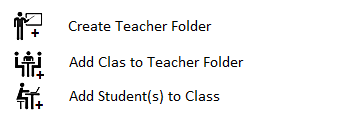
Add Teacher: A teacher folder is created using the ‘Add Teacher’ menu item. However, for security reasons, a teacher folder can only be created from within STACS for the currently logged on user (STACS appends the teacher log on name to the teacher-name entered for future checking). If the proposed teacher name is already in use, STACS will advise of this and request a different teacher-name. If the teacher-name box is left blank or an invalid character is entered or the maximum teacher-name length is exceeded, STACS will advise of this and return you to the main menu. The teacher-name can be edited at any time through the ‘Edit Teacher Name’ item of the Edit menu.
Add Class to Teacher Folder: Once a teacher folder has been created, any number of classes can be added to this teacher-folder through the ‘Add Class for Teacher’ menu item. Should you try to add a class when no teachers have been added, you will be advised that no teachers have been added and directed to return to the main menu. Should you try to add a class without having added the teacher for whom you wish to add the class, you will be advised and directed to return to the main menu. Again, classes can only be added for the logged-on teacher as explained above. The class names can be changed at any time using the ‘Edit Class Name’ item of the Edit menu.
Add Student(s) to Class: Once a class has been added to a particular teacher-folder, students can be added to that class using the ‘Add Student(s) to Class item. A full class of students can be added without returning to the main menu after each addition, making the addition of students a very quick process. Again, if you try to add a student before the correct class has been added, you will be advised and directed to return to the main menu. The student display names, or usernames can be changed at any time using the ‘Edit Student Name’ item of the Edit menu. When adding students, STACS will request the log on name of each student, so the teacher will need to have these to hand. This is a security feature that prevents students sitting tests on behalf of other students. When a student is sitting a test, STACS matches the selected student name to the logged-on student.
 STACS student testing