NOTE: Due to continuous development, the menus displayed on the website may differ slightly from those in the applications.
The Upload menu of STACS is shown below.
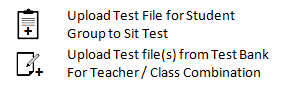
Whereas the first item above is used most often, the order of the descriptions below is reversed to reflect the logical order of using these items.
Upload Test File(s) from External Medium to Teacher/Class Test Bank: STACS maintains a test bank for each Teacher/Class combination. Tests created using the Offline Test Creator Application are stored in a temporary location of a teacher’s choice. They can then be uploaded to a test bank using this option.
Upload Test File from Test Bank to Student Folders for Student Group to Sit Test: As stated above, STACS maintains a test bank for each Teacher/Class combination. Tests are uploaded to a test bank through the ‘Upload Test File(s) From External Medium to Teacher/Class Test Bank’ option in the Upload menu. When you choose ‘Upload Test File From Test Bank to Student Folders for Student Group to Sit Test’ from the Upload menu, you are uploading a test file from the Teacher/Class test bank to a set of student folders so that the students (a class) can sit this test using the STACS Sit Test Application as described later. You are invited to select teacher, class and test. STACS will distribute this test to all relevant student folders. The students will then be directed by the teacher to sit the test. The test itself is deleted once the student completes the test. However, the ‘Delete Test File already Uploaded for Student Group’ item of the Delete menu should be used routinely at the end of each test. Otherwise, as STACS has no way of knowing which students did not turn up to sit the test, the test file would be left in these student’s folders.
 STACS student testing